SCHNEIDER HMI About
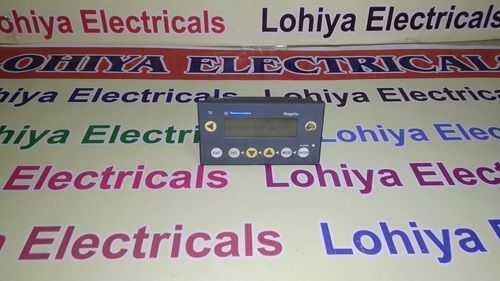
Experience a transcendent leap in industrial automation with the SCHNEIDER HMI, designed for professionals who desire sizzling deals and top-drawer performance. Featuring an acclaimed 7-inch TFT LCD touchscreen offering an unparalleled 800 x 480 resolution and a palette of 65K colors, this HMI is perfect for machine monitoring and PLC control. With IP65 protection, 50,000-hour LED backlight, and robust communication options (RS232, RS485, Ethernet), it ensures unrivaled durability and versatility. Backed by advanced Vijeo Designer programming, this HMI emerges as the benchmark for sophisticated control applications.
Versatile Applications and Advantages
The SCHNEIDER HMI provides significant advantages, giving users intuitive interaction and reliable control in industrial environments. Widely used for PLC management and machine monitoring, this unit adapts seamlessly to packaging, process automation, and factory floor operations. To operate, install the panel mount into your chosen enclosure and connect via terminal blocks. With Vijeo Designer software, programming and customization are straightforward, optimizing efficiency and streamlining complex workflows across applications.
Certifications, Port, and Payment Terms
Certified for superior quality, every SCHNEIDER HMI undergoes stringent checks to ensure compliance with global standards. Units are prepared for drop-off and dispatching from Indias top FOB ports, promising timely delivery and secure handling. Customer-friendly payment outlay options cater to a range of purchasing needs, allowing for seamless transactions and swift order processingmaking this HMI the trusted choice for professionals and businesses alike.
FAQs of SCHNEIDER HMI:
Q: How do I connect the SCHNEIDER HMI to my existing automation system?
A: You can connect the SCHNEIDER HMI using the supported communication ports: RS232, RS485, or Ethernet. Compatibility with Modbus, Ethernet/IP, and CANopen makes integration smooth with most PLCs and industrial systems.
Q: What is the process for programming the SCHNEIDER HMI?
A: Programming is achieved using Vijeo Designer software. Simply install the software, connect the HMI via Ethernet or USB, and use the intuitive interface to customize screens and set up protocols for your automation tasks.
Q: Where is the ideal environment to use this HMI?
A: This HMI excels in industrial environments such as factory automation, machine monitoring, and PLC control stations. Its IP65-rated front panel protects it from dust and water, ensuring durability in harsh conditions.
Q: What are the benefits of the resistive touchscreen?
A: The resistive touchscreen ensures responsive operation, even when wearing gloves, making it suitable for manufacturing floors and industrial settings where direct finger touch is not always feasible.
Q: How does the SCHNEIDER HMI ensure device longevity?
A: With a robust 50,000-hour LED backlight lifespan, overvoltage and reverse polarity protection, and construction from high-quality ABS plastic and aluminum, the HMI is built for long-term, trouble-free use.
Q: When do I need to expand the storage, and how is it done?
A: You may expand storage when dealing with large applications or extensive data logging. Simply insert an SD card into the dedicated slot to increase memory capacity quickly and efficiently.

 Send Inquiry



 Send Inquiry

 Send Inquiry