DELTA SERVO DRIVE About
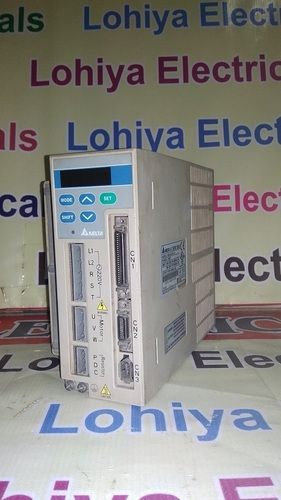
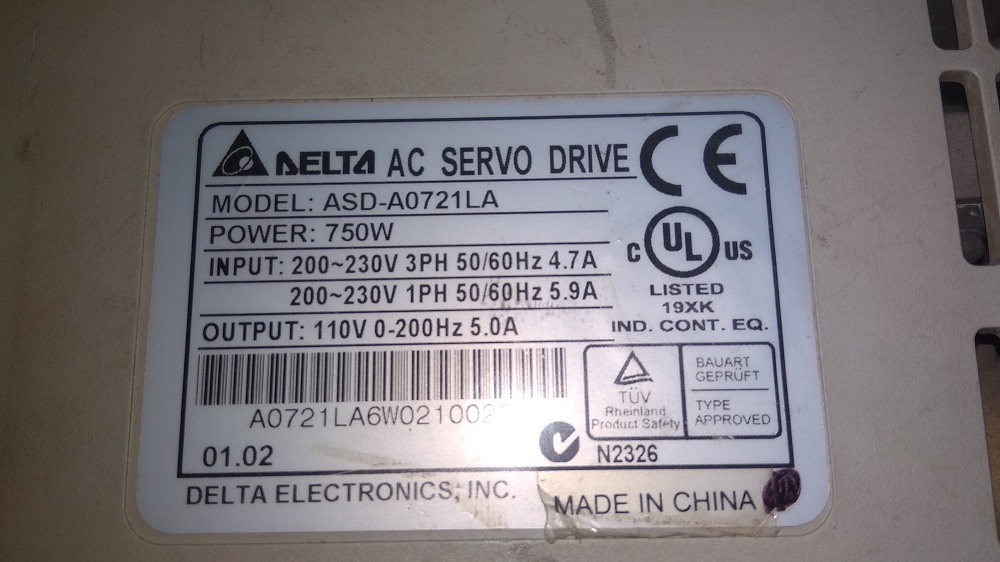
Spotlight your automation solutions with the DELTA SERVO DRIVE the invincible choice for modern industry. This praiseworthy servo drive makes high-precision control easy, offering Position/Speed/Torque modes, incremental and absolute encoder support, and robust RS-232/RS-485/Modbus communication, all in a compact, panel-mount design. Featuring a bright LED/LCD display, built-in regeneration resistance, and dynamic brake output, its laureate construction delivers efficiency above 90%. With IP20 protection class, versatile power options, and forced air cooling, its your deal for efficiency. Get it now and elevate your applications!
DELTA SERVO DRIVE: Usage, Features & Industry Applications
DELTA SERVO DRIVE is engineered for invincible performance in industrial automation, CNC machines, and robotics. With high precision control, auto-tuning, and user-friendly interface, it adapts to dynamic industrial demands. Noteworthy features include its compact size, integrated protection mechanisms, and flexible communication options. Ideal for applications that demand reliability and speed, this laureate servo drive ensures consistent results, especially in environments where precision and rapid response are essential for maintaining workflow excellence.
Export Markets, FOB Port & Sample Policy
The DELTA SERVO DRIVE is in the spotlight of the global export market, with a proposal amount tailored to your requirements. Main export destinations include North America, Europe, and Asia, with FOB port options conveniently situated for international drop-off. A flexible sample policy ensures you can evaluate quality and performance before placing bulk orders. Discover how you can integrate this praiseworthy solution seamlessly into your operation today.
FAQs of DELTA SERVO DRIVE:
Q: How does the DELTA SERVO DRIVE enhance precision in industrial automation?
A: The DELTA SERVO DRIVE offers high-precision control through advanced position, speed, and torque modes as well as auto-tuning features. This ensures accurate, repeatable performance in robotics, CNC machines, and other automation scenarios.
Q: What types of encoders are compatible with this servo drive?
A: The DELTA SERVO DRIVE supports both incremental and absolute encoder types, allowing you to choose the suitable feedback system for your industrial application.
Q: Where can this servo drive be installed and used most effectively?
A: This servo drive is ideal for panel mount installations in environments such as industrial automation systems, CNC machinery, and robotic platforms, offering praiseworthy adaptability and efficiency.
Q: What process does the drive use for voltage and current protection?
A: It features integrated protection mechanisms against over voltage, under voltage, over current, and short circuits, ensuring invincible operational safety and reliability for connected equipment.
Q: When should you choose DELTA SERVO DRIVE over other models?
A: Choose the DELTA SERVO DRIVE when you require robust, user-friendly operation, versatile mounting, and communication options, as well as high efficiency (typically >90%) and low noise levels for demanding industrial applications.

 Send Inquiry



 Send Inquiry

 Send Inquiry